
Last updated on
Nov 6, 2026
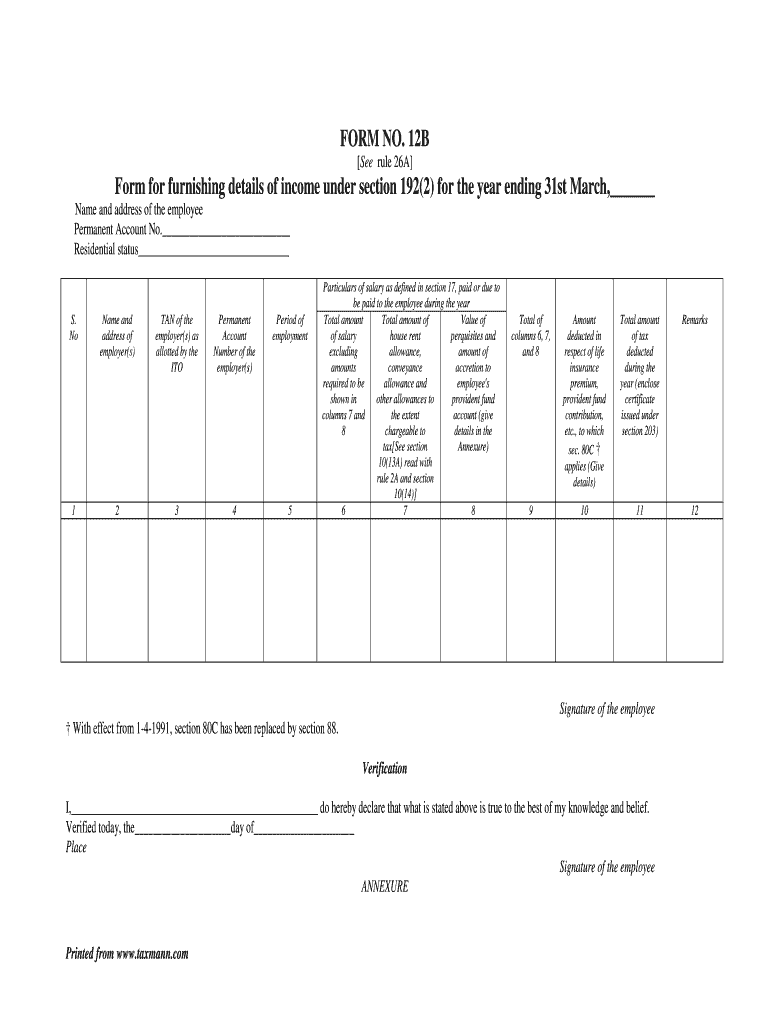
Get the free Form 12B for Employee Income Details
We are not affiliated with any brand or entity on this form

Fill out
Complete the form online in a simple drag-and-drop editor.

eSign
Add your legally binding signature or send the form for signing.

Share
Share the form via a link, letting anyone fill it out from any device.

Export
Download, print, email, or move the form to your cloud storage.
Why pdfFiller is the best tool for your documents and forms


End-to-end document management
From editing and signing to collaboration and tracking, pdfFiller has everything you need to get your documents done quickly and efficiently.
Accessible from anywhere
pdfFiller is fully cloud-based. This means you can edit, sign, and share documents from anywhere using your computer, smartphone, or tablet.
Secure and compliant
pdfFiller lets you securely manage documents following global laws like ESIGN, CCPA, and GDPR. It's also HIPAA and SOC 2 compliant.
What is Form 12B
The Form 12B for Employee Income Details is a tax document used by employees in India to furnish their income details to employers for tax deduction at source (TDS) purposes.
pdfFiller scores top ratings on review platforms




Invaluable! I use this every workday! I am continuously learning more ways to utilize the features PDFfiller offers. Sometimes I have found my answer before customer service can but we are all learning. Thanks
Really nice tool
Really nice tool, works seemingly and is very powerful!
Who needs Form 12B?
Explore how professionals across industries use pdfFiller.

Form 12B is needed by:
-
Employees reporting income in India
-
HR departments managing employee income details
-
Tax consultants assisting clients with TDS
-
Organizations handling payroll and tax compliance
-
Individuals needing to report salary and perquisites
Comprehensive Guide to Form 12B
What is Form 12B for Employee Income Details?
Form 12B is a pivotal document in India, utilized by employees to report their income details for tax purposes. This form serves a crucial role in ensuring accurate tax deductions at source (TDS). Its significance lies in the necessity for employers to collect and verify comprehensive employee income information.
Form 12B includes various key components, including personal details, salary specifics, and perquisites. Understanding this form can greatly enhance the clarity of an employee's financial data in the tax reporting process.
Purpose and Benefits of Completing Form 12B
Completing Form 12B accurately yields several advantages for both employees and employers. Firstly, precise income reporting is essential for correct tax deductions, which can significantly impact net income. Secondly, the form simplifies the overall tax filing process by providing a clear framework for income declaration.
Additionally, utilizing Form 12B helps prevent discrepancies in salary calculations and tax obligations, fostering streamlined communication between employees and their employers.
Who Needs to Fill Out Form 12B?
Form 12B is primarily required by employees working in organizations that mandate TDS documentation. It is particularly relevant in certain employment scenarios, such as when employees receive a salary from multiple employers or if they have additional income sources that necessitate reporting.
These circumstances highlight the necessity for diverse employment categories to utilize this form, ensuring accurate income documentation and compliance with tax regulations.
How to Fill Out Form 12B for Employee Income Details Online
To fill out Form 12B online, follow these instructions:
-
Access a digital template of Form 12B through a reliable platform.
-
Input your personal information accurately, including your name and identification details.
-
Fill in the salary details along with any perquisites provided by your employer.
-
Review all sections to ensure accuracy and completeness before submission.
Confirm that the information aligns with your official records to avoid potential discrepancies in tax assessments.
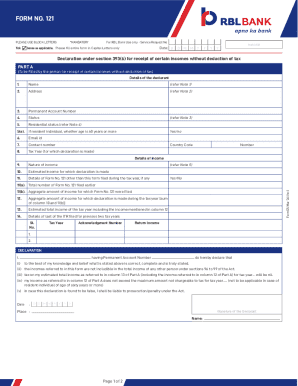
Key Sections and Field-by-Field Instructions in Form 12B
The structure of Form 12B is divided into several key sections, each serving a specific purpose:
-
Personal Information: This section requires basic details including name, address, and PAN.
-
Salary Details: Report your gross salary, including bonuses and allowances.
-
Perquisites: Document any additional benefits received from your employer.
Be mindful of common errors such as incorrect data entry or missing fields. Each section should be meticulously reviewed before the final submission to ensure all data is accurate and complete.
Submission Methods for Form 12B
Employees can submit Form 12B through various methods, ensuring convenient processing. The accepted submission methods include:
-
Online submission via designated tax portals.
-
In-person delivery to the HR department or tax office.
Adhering to specified deadlines is essential, as late submissions can result in penalties. Ensure you are aware of processing timelines to avoid issues.
Security and Compliance When Handling Form 12B
Security is paramount when managing sensitive documents like Form 12B. pdfFiller uses advanced measures, including 256-bit encryption, to protect employee income data during the document management process. Compliance with regulations such as GDPR and HIPAA ensures that personal information is safeguarded throughout handling.
Proper management of this data not only protects the employee but also upholds the integrity of the reporting process.
Why Use pdfFiller for Completing Form 12B?
pdfFiller provides a user-friendly platform equipped with versatile features for filling out Form 12B. These features include:
-
Creation of fillable forms that users can easily interact with.
-
eSignature capabilities for secure signing of documents.
-
Editing tools for correcting or updating form information.
With cloud-based accessibility, users can manage their forms from any location, enhancing convenience and efficiency in completing their tax obligations.
Accessing and Downloading Form 12B
To access and save Form 12B, you have several options available:
-
Download the form template in multiple formats such as PDF or DOCX.
-
Ensure the integrity of the form by using trusted sources for downloading.
-
Follow correct instructions for printing, ensuring the document is ready for submission.
Always double-check the downloaded version to confirm all necessary details are present and correct.
Final Thoughts on Completing and Submitting Form 12B
Completing Form 12B is integral for meeting tax compliance standards. Utilizing pdfFiller’s comprehensive tools can facilitate a streamlined experience when filling out the form. Employees are encouraged to take action promptly and access the resources needed to complete Form 12B efficiently.
How to fill out the Form 12B
-
1.To begin, access pdfFiller and search for 'Form 12B'. You can also directly upload the PDF if you have a copy.
-
2.Once the form is open, familiarize yourself with the layout, which includes sections for personal information, salary details, and perquisites.
-
3.Gather necessary information such as your PAN, salary structure, benefits, and any other income sources before starting the filling process.
-
4.Begin filling in the personal information section with your name, address, and PAN number. Ensure all entries are accurate.
-
5.Next, move to the salary details section. Input your basic salary, allowances, and other earnings as specified.
-
6.Continue to the perquisites section if applicable. Clearly denote any additional benefits received during the financial year.
-
7.Use the checkboxes provided to confirm that all information has been accurately entered. This can help avoid common mistakes.
-
8.Once all fields are complete, review the entire form for errors. Ensure all figures and information are correct to prevent issues with TDS.
-
9.To finalize the form, use the 'Review' feature on pdfFiller, which highlights any missing information or errors.
-
10.After verifying the details, you can save or download the form directly from pdfFiller. Choose the preferred format for submission.
-
11.If required, print the completed form and sign it. Then, submit it as instructed by your employer, either physically or via email.

Who is eligible to fill out Form 12B?
Any employee in India who is required to provide their income details to their employer for tax deduction at source (TDS) can fill out Form 12B.
What documents do I need to complete Form 12B?
You will need your PAN card, salary slip, details of allowances, perquisites, and any additional income information to accurately complete Form 12B.
Is there a deadline for submitting Form 12B?
Form 12B should be submitted to your employer at the beginning of the financial year or whenever there are changes in your income details. Be sure to check company-specific deadlines.
How is Form 12B submitted?
Form 12B can be submitted physically by handing it over to your HR department, or it may be submitted via email based on your employer's preference. Confirm the submission method with your employer.
What are common mistakes to avoid when filling out Form 12B?
Ensure that all personal details and income figures are accurate. Common mistakes include misreporting salary amounts, failing to include all allowances, and not signing the form.
How long does it take to process Form 12B once submitted?
Processing times can vary by employer. Generally, it should be processed within a few weeks, but check with your HR department for specific timelines.
Related Content
Related Forms




Related Catalogs
Get the latest insights from our blog


If you believe that this page should be taken down, please follow our DMCA take down process
here
.
This form may include fields for payment information. Data entered in these fields is not covered by PCI DSS compliance.